
1Pick a letter
2Meet the A friend in the book
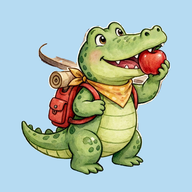
Arnie the Alert Alligator
Page 5 begins:
“Alert and adventurous, Arnie the Alligator ate appetizing apples in Atlanta, Georgia.”
On every page the name, the animal, the food and the city all start with that page’s letter, and so do the words that describe them.
3Make your own A friend
Say the words out loud together. A grown-up can do the typing. Tap a word from the book to use it, or type your own.
4Hear it and save it
Type a word that starts with A in each box.
Meet all 26 friends, and find the letter hidden in every picture, in the book. Grown-ups will find where to get it under For grown-ups.
Arnie the Alert Alligator
- Food
- Place
Our A to Z: every friend you make, one for each letter.
Make a friend, tap Save, and it lands here. Fill all 26 and you have your own A to Z, the way this book started. It stays on this device only.
Our A to Z
No friends saved yet. Tap a letter to make the first one.
Clear every saved friend?
For grown-ups
This part has links that leave the app, including places to buy the book. Answer the question to open it.
Twenty six letters. Twenty six animal friends. Twenty six foods. Twenty six places to go across America.
A picture book for ages 4 to 8, written together by a father and his daughter. Dadau Publishing, Orlando, Florida, 2026.
- The book’s page
- Kindle edition on Amazon
- Trade and library guide
- The talk: A Family Co-Authoring Blueprint to Consider
On Amazon in 17 countries: find your store.
- Authors
- Olivia Weisman and Loren Weisman
- Publisher
- Dadau Publishing, Orlando, Florida
- Published
- September 17, 2026, first edition
- Library of Congress
- Control Number 2026925069
- ISNI
- 0000 0005 3169 5949 (Olivia Weisman); 0000 0005 2847 0896 (Loren Weisman)
- Records
- Goodreads · Open Library · Wikidata
Libraries and bookstores: order the paperback through Ingram by ISBN 979-8-9953351-5-3.